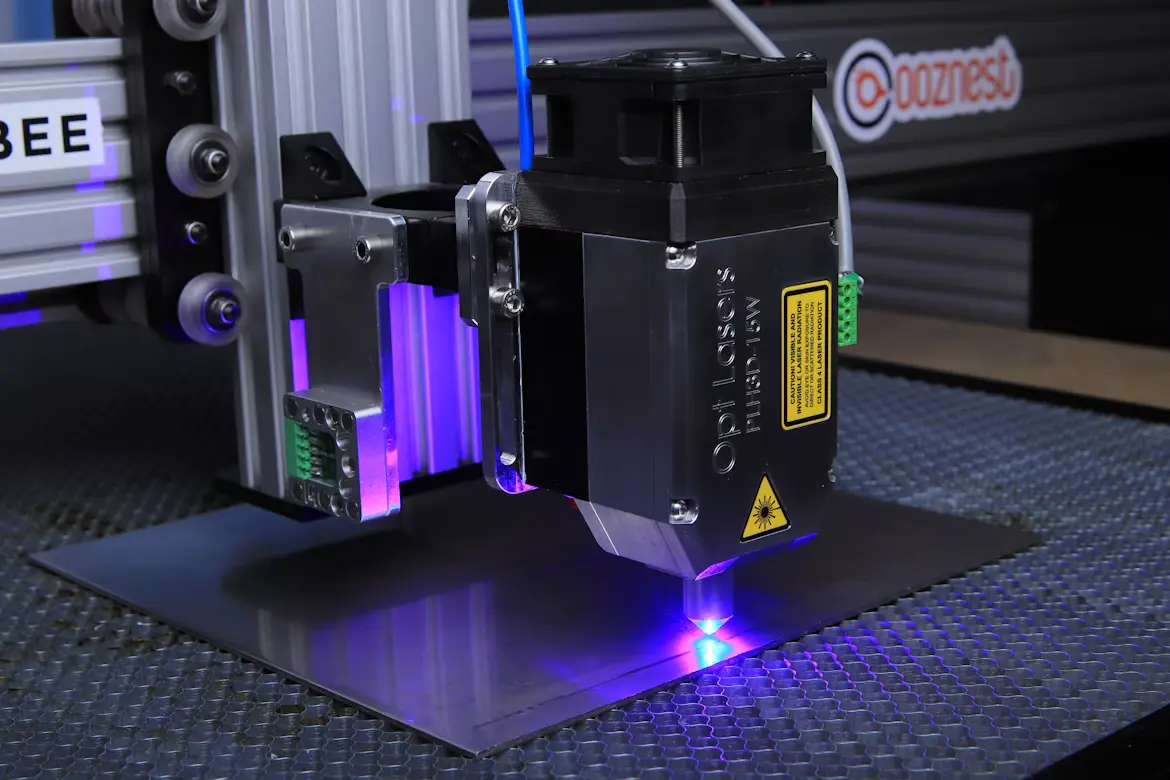
A laser machine can handle detailed designs, custom products, and precise material processing. It gives workshops more control over how they create and finish products. However, buying one requires more thought than checking its advertised power or speed. The right equipment should match the materials, project sizes, and production demands of your work.
A laser engraver machine can mark names, patterns, logos, and decorative details on compatible surfaces. Cutting equipment serves a different purpose by separating materials into specific shapes and dimensions. Some systems perform both operations, which makes them useful for businesses with varied production needs. Understanding these differences helps buyers decide whether the equipment deserves a place in their workshop.
How Engraving and Cutting Serve Different Purposes
Engraving and cutting use focused laser energy, but their results are different. A laser engraver machine removes or changes a thin surface layer to create visible designs. Cutting directs enough energy through a material to separate it along a planned path. Both processes depend on suitable settings, material properties, and correct machine operation.
What Are the Main Differences Between Laser Engravers and Laser Cutters?
Engraving focuses on surface details rather than separating the entire material. It works well for personalized gifts, product labels, signs, decorative panels, and identification marks. Operators adjust power, speed, and focus to control the appearance and depth of the design.
Cutting requires enough energy to pass through the material. The laser follows a defined path and creates individual components from a larger sheet. A laser cutter machine is useful for making signs, packaging parts, furniture components, templates, and product shapes.
Some machines combine these functions in one system. This allows an operator to engrave a design before cutting its outline. However, the actual capabilities depend on the laser source, output power, working area, and supported materials.
Choosing the Right Laser for Your Materials

Material compatibility should guide the buying decision. Different laser sources operate at different wavelengths, and materials respond differently to those wavelengths. Choosing the wrong technology can lead to poor results, wasted material, and unnecessary operating costs.
Which Type of Laser Is Best Suited for Engraving and Cutting?
Diode lasers are common in smaller workshops and creative spaces. They work well with wood, leather, paper, cardboard, and certain dark acrylic materials. Their compact design makes them suitable for many entry-level projects. However, standard blue diode systems generally struggle with clear acrylic and direct engraving on bare metals.
CO2 lasers are widely used for processing non-metal materials. They can engrave and cut wood, acrylic, leather, paper, and several other compatible surfaces. They are particularly useful when projects involve clear acrylic or larger material sheets. Many systems also require water cooling and suitable exhaust equipment.
Fiber lasers are designed mainly for metal processing. They can mark and engrave stainless steel, aluminum, brass, and other compatible metals. Manufacturing workshops use them for serial numbers, identification plates, jewelry, and detailed markings. They are not the usual choice for cutting wood or acrylic.
UV lasers serve more specialized applications. Their shorter wavelength supports fine marking on selected plastics, glass, and sensitive materials. They can reduce heat-related surface damage in suitable applications. Buyers should select this technology when their work requires those specific results rather than general cutting.
Features That Affect Everyday Performance
The laser source is only one part of the equipment. Mechanical construction, movement control, software, and supporting accessories also affect the final result. These details become especially important when a workshop handles repeated orders.
Working Area and Material Capacity
The working area determines how much material fits inside the machine. A small bed may suit personalized items and individual components. Larger beds provide more room for signs, panels, and batch production.
Check the maximum material dimensions before purchasing. Also consider the machine’s height clearance and supported material thickness. Pass-through openings can help when processing longer pieces that exceed the standard working area.
Power, Focus, and Cutting Accuracy
Laser power influences processing speed and cutting ability. However, higher wattage does not automatically produce better results. Beam quality, optical alignment, focus distance, and material properties also matter.
An autofocus feature can help maintain the correct distance between the laser head and material. Manual focusing may still work well when the operator understands the process. Good motion control also helps maintain consistent lines and accurate shapes.
Software and File Compatibility
Software determines how designs reach the machine. Check whether the system supports common image and vector formats. File compatibility matters when customers provide artwork through different design applications.
The control software should allow adjustments to power, speed, passes, and engraving intervals. Preview functions can help operators identify placement problems before starting a job. Reliable software also makes it easier to repeat designs across multiple orders.
Should You Rent or Buy Laser Equipment?
Not every workshop needs permanent equipment from the beginning. Some businesses receive occasional orders and may not use a machine regularly. Renting can provide access to laser processing without requiring an immediate equipment purchase.
What Should I Consider When Renting a Laser Cutter or Engraver?
Start by checking the rental agreement and the equipment included. Confirm the available laser type, working area, power, and supported materials. Ask whether accessories, software, ventilation, and technical assistance are included.
Next, review the operating conditions. Some rental providers offer training, while others expect users to operate the equipment independently. You should also understand who handles maintenance and repairs during the rental period.
Consider how frequently you expect to use the machine. Renting may suit short projects, product testing, or temporary production requirements. Regular users may find ownership more practical when rental charges accumulate over time.
Finally, check the material restrictions and operating schedule. Some facilities require users to purchase approved materials or reserve machine time in advance. Understanding these conditions prevents unexpected interruptions during production.
Calculating the Real Investment
The purchase price does not represent the complete cost of running laser equipment. Buyers should consider the additional resources needed to operate the machine. These expenses can influence whether ownership makes financial sense.
Equipment, Accessories, and Running Expenses
A complete setup may require ventilation equipment, cooling systems, air assist, protective enclosures, and suitable work surfaces. The requirements depend on the laser technology and machine design. Some systems include essential accessories, while others require separate purchases.
Consumable parts also deserve attention. Lenses, mirrors, filters, and other components may require cleaning or replacement. CO2 systems can also require attention to their laser tubes and cooling arrangements.
Electricity consumption depends on the machine and its supporting equipment. Extraction fans, chillers, and air compressors can contribute to overall operating expenses. Keeping track of these costs helps businesses estimate their actual production expenses.
How to Measure Long-Term Value
A machine becomes a worthwhile investment when its output supports regular business requirements. Consider how many orders it can handle and how much operator time each project requires. Consistent production and fewer material mistakes can improve overall efficiency.
Compare the cost of outsourcing work with the expense of processing it internally. Include materials, electricity, maintenance, labor, and equipment depreciation in your calculations. This gives a clearer picture than comparing the initial purchase price alone.
Quality also matters when evaluating different machines. Look at frame construction, motion components, optical quality, cooling arrangements, and available technical documentation. A lower purchase cost may not provide good value if the equipment needs frequent adjustments.
Safety and Maintenance Should Not Be Overlooked
Laser processing involves intense light, heat, smoke, and potentially harmful fumes. Different materials produce different emissions when exposed to laser energy. Operators should understand the hazards before processing any material.
Use suitable ventilation or filtration for the specific application. Never process unknown materials or substances that may release dangerous gases. PVC and other chlorine-containing materials should not be laser processed because they can release hazardous fumes.
An enclosed system with suitable interlocks can help reduce exposure to laser radiation. Eye protection must match the laser wavelength and applicable safety requirements. Operators should also follow the manufacturer’s instructions and supervise active cutting because fires can develop during processing.
Routine maintenance helps keep the equipment operating consistently. Clean optical components according to the manufacturer’s guidance and inspect belts, rails, and moving parts. Check cooling systems, exhaust connections, and electrical components regularly.
Making a Practical Purchase Decision
Before choosing a machine, list the products you intend to create. Separate engraving requirements from cutting requirements and identify the materials involved. This simple exercise can eliminate equipment that does not support your main applications.
A laser engraver machine should offer suitable material compatibility, reliable movement, and enough working space for your projects. Businesses handling acrylic signs or wooden components may need a different setup from those marking metal products.
Also consider future production requirements. A small workshop may begin with personalized products and later receive larger orders. Choosing equipment with appropriate capacity can reduce the need for an early replacement.
The most sensible purchase is not necessarily the machine with the highest power or largest feature list. It is the equipment that handles your regular work safely, accurately, and consistently. When its capabilities match your production needs, ownership can become a practical part of running the business.
Frequently Asked Questions
Can one machine handle both engraving and cutting?
Yes. Many machines support both operations on compatible materials. Their cutting depth and engraving quality depend on the laser source, power, and machine configuration.
Is a higher-wattage laser always better?
No. Higher power can improve cutting speed and material capacity, but wavelength, focus, beam quality, and material compatibility also affect performance.
Can laser machines process metal and wood?
Different laser types handle these materials differently. CO2 and diode systems work with many wood products, while fiber systems are commonly used for direct metal marking.
Does renting equipment make sense for beginners?
Yes. Renting allows beginners to test projects and understand operating requirements before purchasing equipment. It can also help evaluate demand for a new product range.
What accessories should I consider when buying laser equipment?
Consider ventilation, air assist, cooling, protective enclosures, suitable fixtures, and compatible software. The required accessories depend on the machine and intended materials.
Also Read
- https://grammervision.com/best-accounting-firms-for-financial-service-companies-in-singapore-2027/
https://grammervision.com/why-diversification-remains-a-smart-investing-principle/
https://grammervision.com/ai-influencers-how-virtual-personalities-are-changing-the-world-of-digital-marketing/